Amsterdam Technologies B.V. — Solution Whitepaper

WiFi Analyzer — Real-Time 3D WiFi Network Analysis and Security Auditing

Wireless networks have become the primary attack surface and operational backbone for modern organizations. The average enterprise campus now operates hundreds…

Download as PDF: light · dark

The Problem

Wireless networks have become the primary attack surface and operational backbone for modern organizations. The average enterprise campus now operates hundreds of access points across 2.4 GHz, 5 GHz, and the emerging 6 GHz bands, while even small offices contend with overlapping channels, rogue devices, and an evolving threat landscape that includes evil twin attacks, deauthentication floods, and credential theft via DNS hijacking. Wireless is uniquely exposed because it does not stop at the building line: an attacker within radio range needs no physical access and leaves no cable behind. Yet the tooling most teams have for inspecting it shows a flat list of network names and a signal bar.

Despite the severity of these risks, the tools available to network administrators, security auditors, and IT consultants remain fundamentally inadequate:

Fragmented tooling. Professionals typically rely on a patchwork of utilities — one for scanning, another for channel analysis, a separate packet capture tool, a spreadsheet for compliance mapping, and a vendor-specific dashboard for remediation. Each tool solves a narrow problem, and none shares context with the others. The result is hours of manual correlation for what should be a unified workflow.

Platform lock-in and dependency bloat. Many existing WiFi analysis tools on macOS depend on third-party frameworks, kernel extensions, or external hardware adapters. These dependencies introduce supply chain risk, compatibility issues with each macOS update, and performance overhead. Tools that require Network Extension entitlements or system integrity protection workarounds create friction for IT departments with strict endpoint security policies.

Static, two-dimensional analysis. Traditional WiFi analyzers present data as flat tables or basic line charts. When an administrator is trying to understand the three-dimensional relationship between channel congestion, signal strength, and time-based patterns, a flat RSSI list provides no spatial intuition. Critical patterns — interference cascading across adjacent channels, rogue APs appearing intermittently, signal degradation over time — are invisible in conventional views.

No security context. Most scanning tools report what networks exist. Very few answer the harder question: which networks are dangerous, and why? Open networks are flagged in some tools, but sophisticated threats like SSID spoofing across multiple vendors, WPA2/WPA3 transition mode risks, or beacon interval anomalies that indicate attack toolkits go entirely undetected. Even when threats are identified, the gap between detection and remediation is vast — administrators must manually research vendor-specific mitigation steps and map findings to compliance frameworks like PCI DSS, HIPAA, or ISO 27001.

Compliance reporting as an afterthought. Organizations subject to PCI DSS 4.0, HIPAA, ISO 27001:2022, or NIST SP 800-153 must demonstrate that wireless networks are monitored, secured, and periodically assessed. Building these reports manually — cross-referencing scan data against specific control requirements — is tedious, error-prone, and often done retroactively rather than as a continuous process.

No spatial signal understanding. Planning wireless coverage, diagnosing dead zones, or verifying post-deployment signal quality requires site survey capabilities. Dedicated survey tools cost thousands of dollars, require proprietary hardware, and produce results locked in vendor-specific formats.

The net effect is that wireless network security and optimization remain labor-intensive, context-poor, and reactive. What the market lacks is a single, native, zero-dependency tool that unifies scanning, 3D visualization, security auditing, compliance mapping, and site surveying in one coherent workflow — designed for macOS professionals who need depth without complexity.


Solution Overview

WiFi Analyzer is a native macOS application that delivers real-time WiFi network scanning, hardware-accelerated 3D visualization, enterprise-grade security auditing, and signal surveying in a single, zero-dependency package. Built entirely with Apple-native frameworks — SwiftUI, Metal, CoreWLAN, CoreLocation, SwiftData, and Swift Charts — it requires no third-party libraries, no kernel extensions, and no external hardware.

The core architectural thesis is that WiFi analysis should be a unified, context-rich activity rather than a fragmented collection of point tools. Every design decision flows from this principle:

One application replaces many. Scanning, channel analysis, security auditing, wireless intrusion detection, compliance mapping, vulnerability assessment, vendor-specific remediation, site surveying, and reporting are all integrated into a single binary. Data flows automatically between these capabilities — a scan result feeds the security auditor, which feeds the compliance mapper, which feeds the export engine. No manual correlation required.

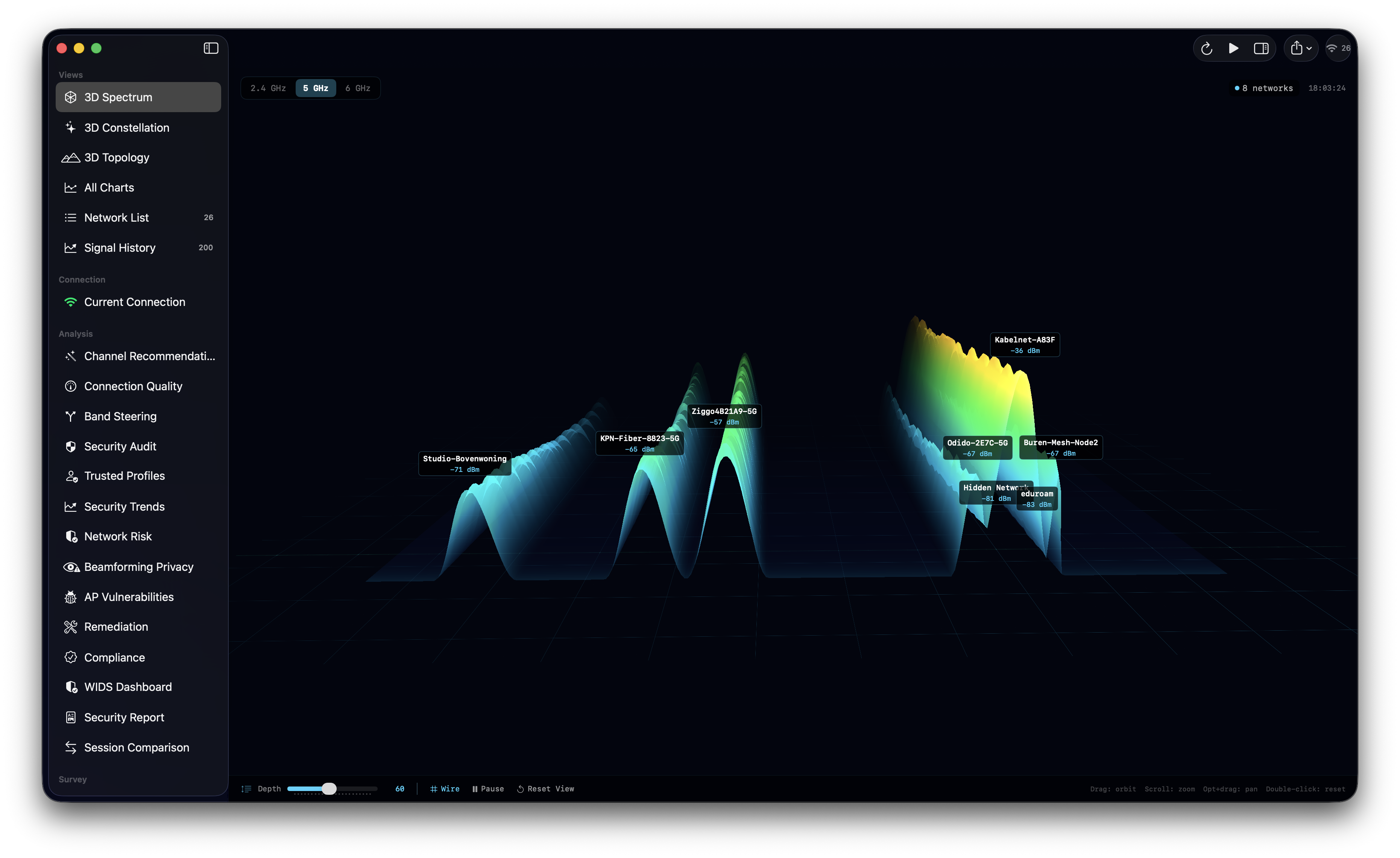
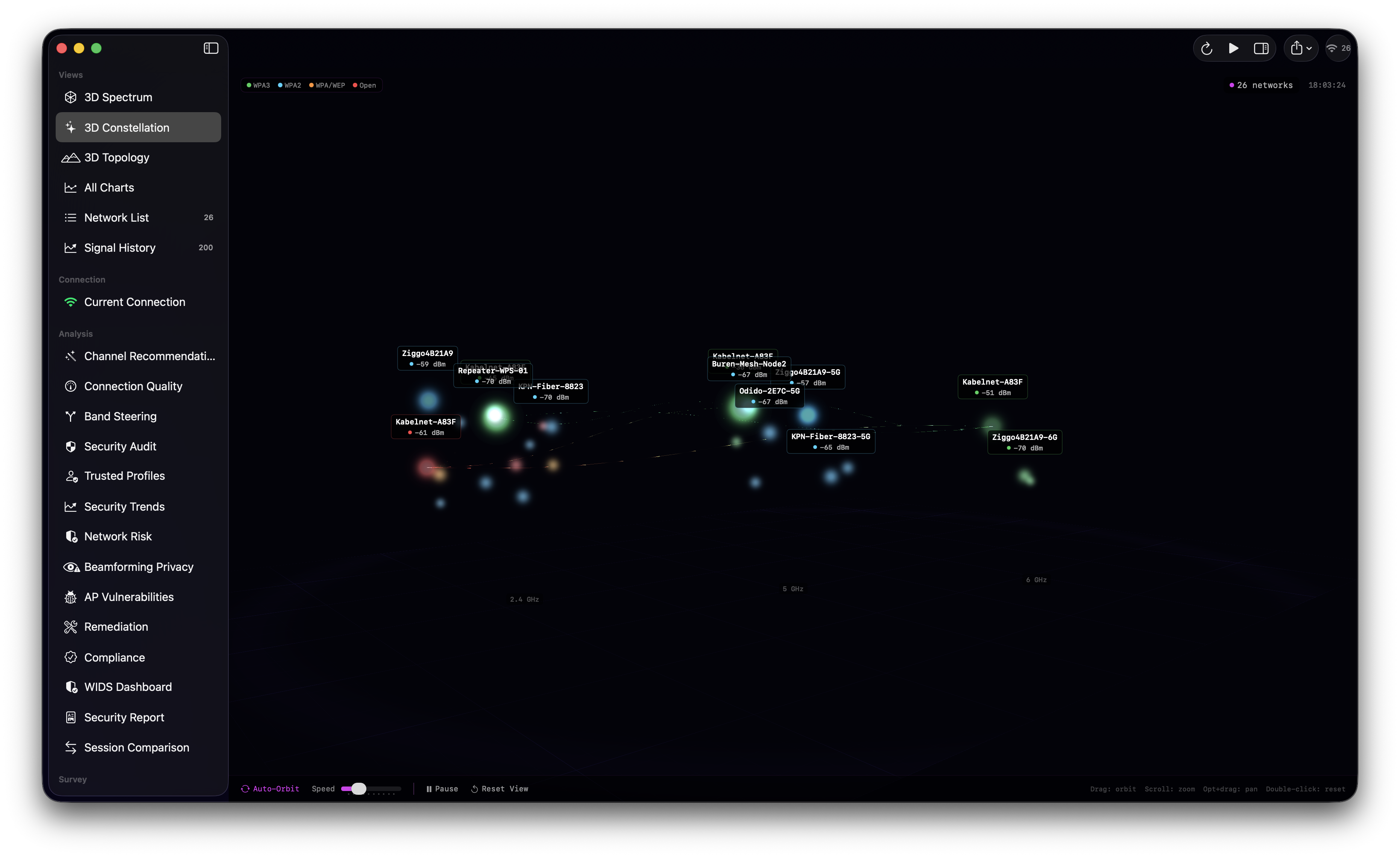
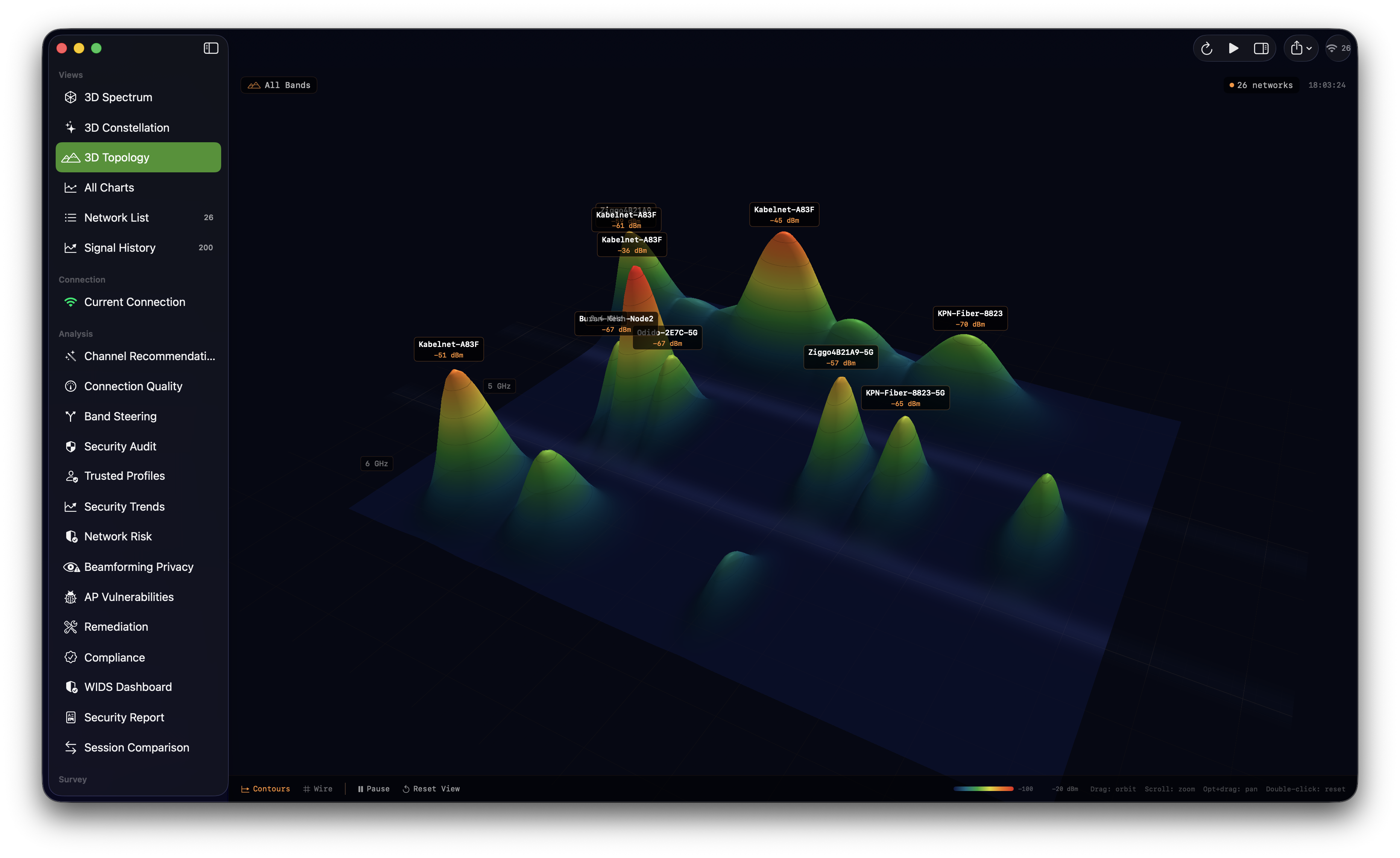
Metal GPU acceleration for spatial understanding. WiFi data is inherently multidimensional — channels, bands, signal strength, and time all interact. WiFi Analyzer renders this data as three distinct 3D Metal visualizations: a spectrum waterfall, a network constellation, and a signal topology surface. These are not decorative — they transform pattern recognition from a cognitive task into a visual one, making channel interference, rogue AP clustering, and signal degradation immediately apparent.

Zero dependencies for zero supply chain risk. Every framework used — CoreWLAN, Metal, MetalKit, SwiftUI, SwiftData, Swift Charts, CoreLocation, UserNotifications — ships with macOS. There is no dependency graph to audit, no third-party library updates to track, and no risk of upstream supply chain compromise. The application's attack surface is limited to Apple's own frameworks.

Security-first design. The 17-category security audit, wireless intrusion detection system (WIDS), compliance mapping engine, AP vulnerability database, and network risk scoring system are not bolt-on features. They form the analytical core of the product, designed to surface threats that conventional scanners miss — from beamforming privacy exposure (based on BFId research from KIT KASTEL) to WiFi Pineapple detection via network proliferation patterns.

WiFi Analyzer is currently in beta, available for macOS 14.0 (Sonoma) and later, with active development toward a 1.0 release.


Key Capabilities

Real-Time WiFi Scanning and Monitoring

WiFi Analyzer performs continuous network discovery via CoreWLAN with a configurable scan interval ranging from 1 to 30 seconds (defaulting to 3 seconds). It supports all three modern WiFi bands — 2.4 GHz, 5 GHz, and 6 GHz — and operates in an event-driven mode that monitors changes to SSID, BSSID, link state, and power state in real time rather than relying solely on periodic polling.

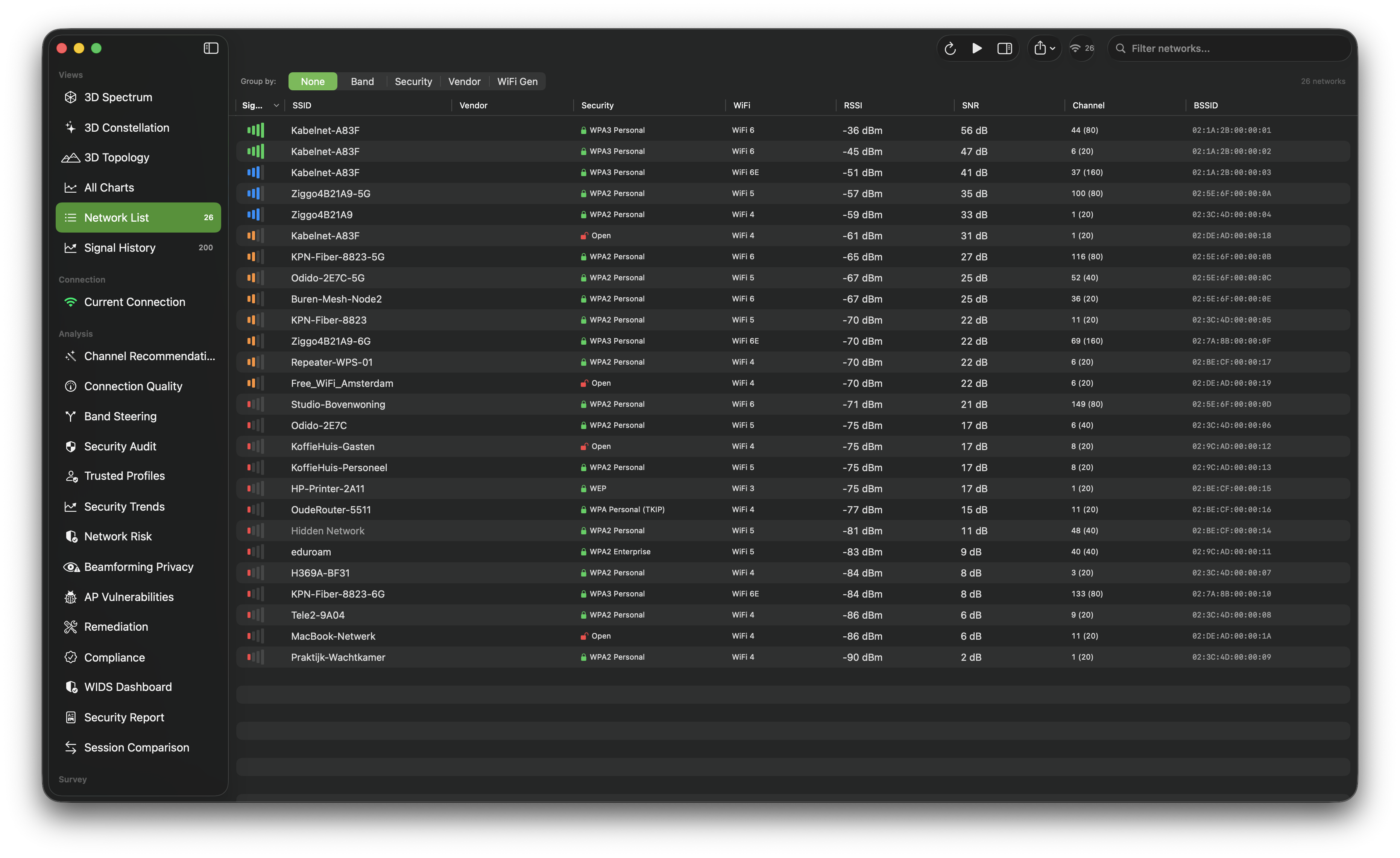
For each discovered network, the application reports a comprehensive data set: SSID, BSSID, RSSI (received signal strength indicator), noise floor, SNR (signal-to-noise ratio), channel number, channel width (20/40/80/160 MHz), frequency band, WiFi generation (802.11a/b/g, WiFi 4/5/6), security protocol (WPA3 Personal/Enterprise, WPA3 Transition, WPA2 Personal/Enterprise, WPA, WEP, Open), PMF (Protected Management Frames, 802.11w) status, country code, beacon interval, IBSS (ad-hoc) mode, and hardware vendor identified through an OUI lookup database with over 450 built-in entries.

A rolling scan history buffer retains approximately 30 minutes of data at the default interval, enabling trend analysis and historical comparison without requiring an explicit recording session. Multi-interface support allows users to select any available WiFi interface on the Mac, and a persistent menu bar extra provides at-a-glance connection status and latency readings without requiring the main application window to remain in the foreground.

Before WiFi Analyzer, obtaining this level of detail required combining macOS's built-in Wireless Diagnostics utility (limited and designed for Apple support engineers) with command-line tools and third-party applications. WiFi Analyzer consolidates all of this into a single, continuously updating view.

Hardware-Accelerated 3D Metal Visualizations

The product's most visually distinctive capability is its three Metal-rendered 3D visualizations, each designed to reveal specific patterns in wireless data that are invisible in traditional 2D representations:

3D Spectrum Waterfall. This visualization renders a terrain mesh with WiFi channels mapped to the X-axis, time progression on the Z-axis, and signal strength represented as surface height. Topographic heat coloring — transitioning from cool tones for weak signals to warm tones for strong ones — creates an intuitive visual metaphor. An interactive arcball camera allows rotation, zoom, and pan. The waterfall reveals temporal patterns: intermittent interference, periodic rogue AP appearances, and signal strength trends that would be invisible in a static channel chart.

3D Network Constellation. Networks are represented as animated orbs positioned by channel and band, with particle trails connecting access points that share the same SSID. This view is particularly valuable for visualizing multi-AP deployments — how a corporate SSID is distributed across channels and bands — and for identifying anomalies like SSID spoofing, where two orbs share a name but originate from different vendors. An auto-orbiting camera provides a cinematic overview, while manual arcball control enables focused inspection.

3D Signal Topology. This view creates a unified terrain surface spanning all channels and bands, with signal strength determining surface height. The topology morphs in real time between scan frames, creating a living landscape of the wireless environment. It is the most effective view for understanding broad-spectrum congestion — which bands are crowded, which channels have headroom, and where dead zones exist.

All three visualizations are rendered directly by the GPU via Apple's Metal framework, ensuring smooth frame rates even when processing hundreds of network data points. This is not a web-based WebGL implementation or an OpenGL compatibility layer — it is native Metal, leveraging the same GPU pipeline used by professional macOS applications.

2D Charts and Analytical Views

Complementing the 3D visualizations, WiFi Analyzer provides a comprehensive set of 2D analytical views built with Swift Charts:

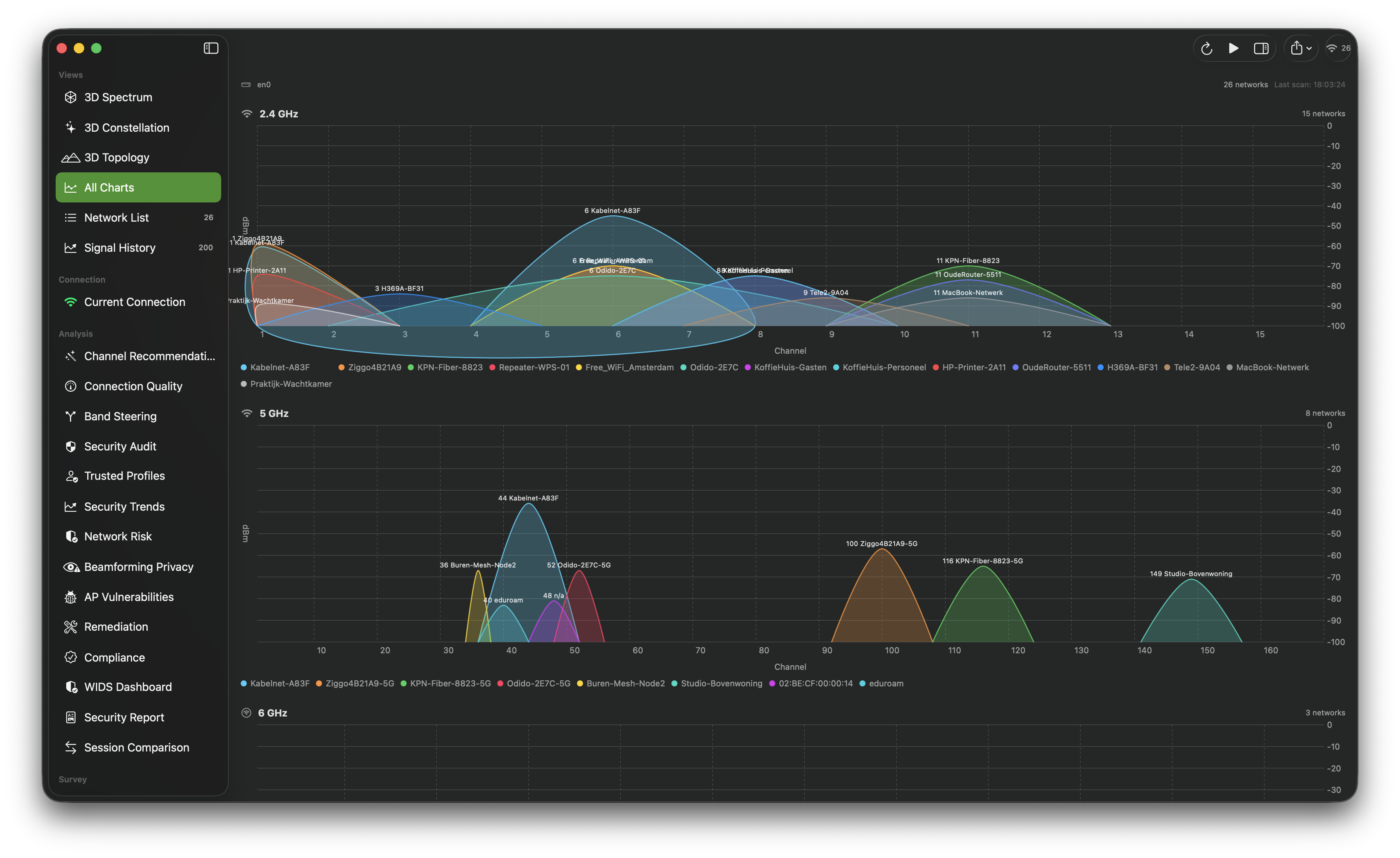
  • Channel utilization charts present stacked per-band views showing which channels are most congested and by how many networks.
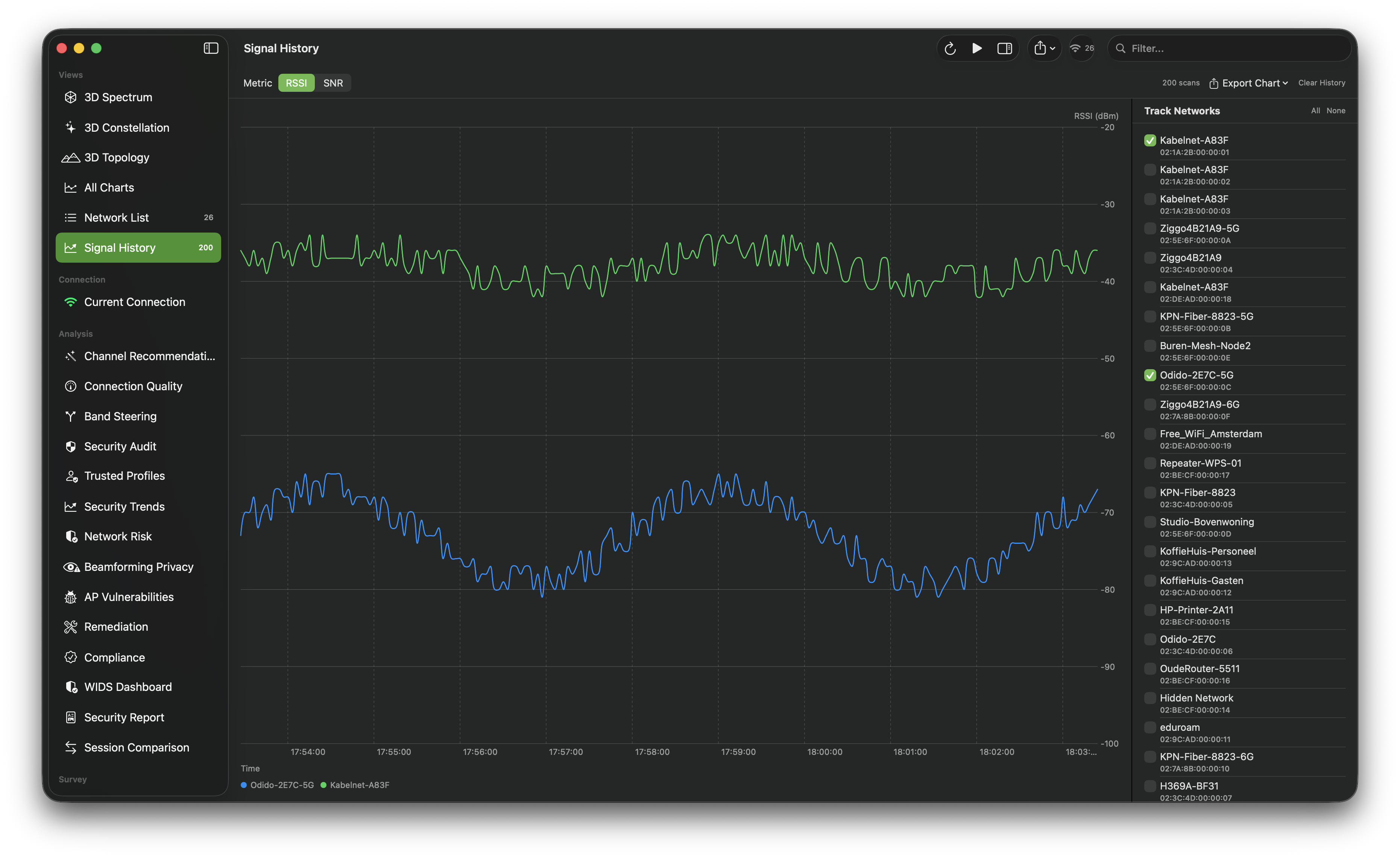
  • Signal history graphs plot RSSI and SNR as time series across the scan history buffer, enabling trend analysis for connection quality.
  • Network list provides a sortable, filterable table of all discovered networks with full data columns.
  • Per-band views offer dedicated 2.4 GHz, 5 GHz, and 6 GHz panels, each combining a channel chart with a filtered network list for focused analysis.

Channel Analysis and Optimization

The channel recommendation engine evaluates congestion, overlap, and interference patterns to suggest optimal channels for each band. Rather than simply listing the least-used channel, the engine considers overlapping channel interference (particularly relevant in the 2.4 GHz band where channels 1, 6, and 11 are the only non-overlapping options), the number of networks on each channel, and the aggregate signal strength of competing networks.

Band steering analysis groups SSIDs that appear on multiple bands and recommends the optimal band based on a composite assessment of signal strength, congestion levels, WiFi generation capabilities, and available channel width. For enterprise environments with dual-band or tri-band deployments, this analysis directly informs AP configuration decisions.

Connection Quality Monitoring

The current connection inspector provides a real-time dashboard of the active WiFi connection: live RSSI, noise floor, SNR, transmit rate, PHY mode, and security protocol details. Beyond passive monitoring, the application performs continuous ping-based latency measurement, reporting jitter, packet loss percentage, and min/max/average statistics.

A composite connection health score on a 0–100 scale synthesizes multiple degradation signals: security downgrades (e.g., fallback from WPA3 to WPA2), transmit rate drops, signal instability (variance in RSSI over time), forced roaming events, weak signal thresholds, and elevated noise floors. This score provides a single metric that IT support teams can use to quantify "my WiFi is slow" reports.

Security Auditing (17 Check Categories)

The security audit engine evaluates every discovered network against 17 distinct check categories, organized by severity:

Critical severity: Open network detection identifies unencrypted networks that expose all traffic to passive interception. Weak encryption detection flags networks still using WEP or WPA1, both of which have well-documented cryptographic weaknesses that allow key recovery in minutes.

High severity: SSID spoofing detection identifies cases where the same SSID appears from multiple vendors — a strong indicator of an attacker mimicking a legitimate network. Rogue AP detection uses signal anomaly analysis and mixed security protocol patterns to identify unauthorized access points. Evil twin pattern recognition correlates deauthentication flood events with rogue AP appearances on the same SSID — the signature of an active man-in-the-middle attack. Deauthentication attack detection identifies 802.11 deauth frame floods. DNS hijacking detection identifies DNS responses that redirect to unexpected destinations.

Medium severity: Security downgrade risk flags environments where WPA2 and WPA3 coexist on the same SSID, creating transition-mode vulnerabilities. PMF (802.11w) missing identifies networks that lack Protected Management Frames, leaving them vulnerable to deauthentication and disassociation attacks. WPS enabled flags the WiFi Protected Setup protocol, which has known brute-force vulnerabilities. This check is implemented but cannot fire on macOS: WPS presence is advertised in a vendor-specific information element, and CoreWLAN exposes no raw information elements to user space, so no macOS application can detect it. WPA2/WPA3 transition mode risk provides more granular analysis of mixed-security deployments. Beacon interval anomalies detect non-standard intervals that may indicate attack tools. Country code anomalies flag regulatory misconfigurations. Ad-hoc (IBSS) network flagging identifies peer-to-peer networks that bypass AP security controls. Network proliferation detection identifies patterns consistent with WiFi Pineapple or similar attack platforms that broadcast dozens of SSIDs simultaneously.

Low severity: Signal leakage detection identifies corporate networks visible outside their intended coverage area. Beamforming privacy exposure analysis, based on BFId research from KIT KASTEL (CCS 2025), evaluates whether beamforming feedback information could be used to track devices.

Variable severity: Trust profile violation detection alerts when a known network's properties — BSSID, security protocol, channel — deviate from a previously established trusted profile.

Wireless Intrusion Detection System (WIDS)

Beyond individual security checks, the WIDS engine correlates events across time and categories to identify compound attack patterns:

  • Evil Twin Attack: Correlates deauthentication flood detection with the simultaneous appearance of a rogue AP broadcasting the same SSID as a legitimate network.
  • WiFi Attack Tool: Correlates network proliferation (many new SSIDs appearing simultaneously) with deauthentication activity — the signature of an automated attack platform.
  • Credential Theft: Correlates DNS hijacking detection with captive portal behavior — indicating an attacker redirecting users to a phishing page.

Each correlated event generates a threat narrative with actionable recommendations, transforming raw security events into incident-ready intelligence.

Compliance Mapping

The compliance mapping engine automatically maps security audit findings to specific controls across four major frameworks:

  • PCI DSS 4.0: Requirements 2.3.1 (wireless encryption), 4.2.1 (strong cryptography for transmission), 11.2.1 (wireless access point identification), and 12.3.3 (risk assessment documentation).
  • HIPAA: Sections 164.312(e)(1) (transmission security), 164.312(e)(2)(ii) (encryption), 164.312(a)(1) (access control), and 164.312(c)(1) (integrity controls).
  • ISO 27001:2022: Controls A.8.20 (network security), A.8.21 (web filtering), A.8.22 (segregation of networks), and A.5.7 (threat intelligence).
  • NIST SP 800-153: Sections 3.1, 4.1, and 5.1 covering wireless monitoring, security assessment, and continuous monitoring.

This mapping transforms scan data into audit evidence, eliminating the manual cross-referencing that typically consumes hours of a compliance analyst's time.

AP Vulnerability Assessment

The vulnerability assessment module maintains a curated database of known CVEs per vendor, including high-profile vulnerabilities such as KRACK (Key Reinstallation Attacks), FragAttacks (fragmentation and aggregation attacks), Dragonblood (WPA3-SAE vulnerabilities), and vendor-specific CVEs. Using OUI-based vendor identification and WiFi generation data, the engine estimates the hardware family of each discovered AP and flags devices that are likely running end-of-life firmware or hardware with known, unpatched vulnerabilities.

Vendor-Specific Remediation

When security issues are identified, WiFi Analyzer provides step-by-step remediation instructions tailored to seven major wireless vendors: Ubiquiti, Cisco/Meraki, Aruba, Netgear, TP-Link, ASUS, and Linksys. Each remediation guide includes a priority level (Fix Immediately, This Week, This Month, or Nice to Have) and an effort estimate, enabling IT teams to triage and schedule fixes effectively rather than treating all findings with equal urgency.

Network Risk Scoring

Each discovered network receives a weighted risk score computed across 11 factors: encryption strength (24% weight), signal anomaly (14%), network age (10%), vendor reputation (9%), SSID suspiciousness (9%), ad-hoc flag (9%), channel congestion (5%), beacon interval (5%), country code (5%), downgrade risk (5%), and beamforming privacy exposure (5%). The weighting reflects real-world attack probability and impact — encryption weakness is the single largest factor because it is the most exploitable and consequential vulnerability.

Signal Survey and Heatmap Generation

WiFi Analyzer includes a built-in site survey tool. Users load a floor plan image as an overlay, then use a click-to-measure workflow to record signal data at specific locations. The application generates an interpolated heatmap using Inverse Distance Weighting (IDW) with configurable resolution and IDW power parameters. The resulting heatmap can be exported as a PNG image, providing visual documentation of coverage, dead zones, and signal quality across a physical space — a capability that previously required dedicated survey hardware costing thousands of dollars.

Session Recording, History, and Trusted Profiles

Named scan sessions allow users to start and stop recording with persistent storage via SwiftData, creating discrete data sets for specific audit windows or troubleshooting periods. Session comparison enables side-by-side diffing of two sessions, revealing what changed between assessments — new networks, disappeared APs, security degradations.

A known networks database tracks every network ever seen, recording first seen timestamp, last seen timestamp, total sighting count, best RSSI observed, and user-assigned favorites. A roaming event log captures BSSID changes, link up/down events, and SSID transitions. Security audit trends track findings over time, showing whether the wireless environment is improving or degrading. Trusted network profiles can be manually defined or auto-learned from observed behavior; any deviation from a trusted profile triggers an alert.

Export and Reporting

WiFi Analyzer supports four export formats: CSV (RFC 4180 compliant with metadata header), JSON (pretty-printed with ISO 8601 date formatting), PNG (chart and view screenshots rendered at 2x Retina resolution), and PDF (vector chart export for print-quality reports). These outputs are suitable for inclusion in compliance documentation, incident reports, and management presentations.

Notifications and Alerting

Configurable macOS notification center alerts provide real-time awareness of critical events without requiring the application to be in the foreground: weak signal (configurable threshold, default -70 dBm), high latency (configurable threshold, default 100 ms), new network detection, security changes, roaming events, deauthentication attacks, DNS hijacking, and captive portal detection.


Architecture and Technical Design

Architectural Philosophy

WiFi Analyzer is built on a zero-dependency philosophy: every framework used ships with macOS. The application uses CoreWLAN for WiFi hardware access, CoreLocation for the SSID permission required by macOS 14+, Metal and MetalKit for GPU-accelerated 3D rendering, SwiftUI for the user interface, SwiftData for persistent storage (sessions, known networks, trusted profiles), Swift Charts for 2D visualizations, and UserNotifications for system-level alerts.

This choice is deliberate and strategic. Zero third-party dependencies means:

  • No supply chain attack surface. There are no npm packages, CocoaPods, or Swift Package Manager dependencies to audit. The entire dependency tree is Apple's own frameworks, vetted and signed by Apple.
  • macOS update resilience. When Apple ships a new macOS version, the only compatibility surface is Apple's own framework APIs, which maintain backward compatibility by policy.
  • Minimal binary size. No bundled third-party code, no redundant framework layers.
  • Hardened runtime compatibility. The application runs with App Sandbox and hardened runtime without requiring special entitlements for third-party code signing exceptions.

Data Flow

The scanning service interfaces with CoreWLAN to perform periodic and event-driven network discovery. Raw scan results flow into an in-memory scan history buffer and, when session recording is active, into SwiftData for persistent storage. The analysis pipeline is multi-stage: scan data feeds the channel analyzer, connection quality monitor, and security auditor simultaneously. Security audit results feed the compliance mapper, WIDS correlation engine, vulnerability assessor, and remediation advisor. All outputs are available to the export service and notification system.

This pipeline architecture means that a single scan triggers a cascade of analysis — users do not need to manually invoke each analysis step.

Metal Rendering Pipeline

The three 3D visualizations share a common Metal rendering base that handles device selection, command queue management, render pass descriptor configuration, and arcball camera mathematics. Each visualization subclass defines its own vertex and fragment shaders, geometry generation, and animation logic. The spectrum waterfall generates a terrain mesh dynamically from scan data; the constellation computes orb positions and particle trail geometry per frame; the topology interpolates a continuous surface across discrete data points using real-time morphing.

Metal was chosen over SceneKit or RealityKit because it provides direct control over the rendering pipeline — essential for custom terrain generation, per-vertex coloring from signal data, and smooth animation between scan frames. The visualizations target 60 fps on integrated Apple silicon GPUs.

Privacy and Security Posture

WiFi Analyzer operates within macOS App Sandbox with a minimal entitlement set: outgoing network connections (for latency ping, DNS security checks, and captive portal detection), user-selected file access (for export and floor plan import), and Location Services (required by macOS 14+ for SSID access). It does not request inbound network connections, kernel extension permissions, or access to contacts, photos, or other personal data.

All data is stored locally on the user's Mac via SwiftData. No scan data, network information, or security findings are transmitted to Amsterdam Technologies or any third party. The application is signed with a Developer ID certificate, notarized by Apple, and distributed with a stapled notarization ticket.

Testing and Quality Assurance

The application includes 19 test suites covering all major services: security auditor, channel analyzer, export service, OUI database, deauthentication detector, network change detector, band steering analyzer, connection health monitor, network risk scorer, beamforming privacy analyzer, compliance mapper, WIDS engine, AP vulnerability database, passphrase guidance, PMF detection, remediation advisor, trusted profiles, model serialization round-trips, and chart series builder. Tests use mock WiFi network data, enabling full test coverage without requiring WiFi hardware.


Use Cases and Scenarios

1. PCI DSS Compliance Audit at a Retail Chain

Role: IT Security Auditor at a mid-size retail company with 50+ store locations.

Challenge: PCI DSS 4.0 requirement 11.2.1 mandates quarterly identification of authorized and unauthorized wireless access points. The auditor currently walks each store with a consumer-grade WiFi scanner, manually records findings in a spreadsheet, and cross-references them against the approved AP list.

How WiFi Analyzer addresses this: The auditor launches WiFi Analyzer, starts a named scan session for the specific store, and walks the premises. The application continuously discovers all networks across all bands, recording every AP with its BSSID, vendor, security protocol, and signal strength. The security audit engine automatically flags open networks, weak encryption, and rogue APs. The compliance mapper generates PCI DSS 4.0-specific findings referencing requirements 2.3.1, 4.2.1, and 11.2.1. The auditor exports results as JSON for import into their GRC platform and PDF for the audit binder.

Outcome: Audit time per location drops from 2+ hours of manual work to under 30 minutes. Compliance mapping is automatic rather than manual. Session recording creates a persistent, comparable record for quarterly trend analysis.

2. Evil Twin Detection at a Financial Services Firm

Role: Network Security Engineer at a bank's headquarters campus.

Challenge: The security team has received reports of employees connecting to suspicious WiFi networks in the building lobby. They suspect an evil twin attack targeting the corporate SSID but have no tooling to confirm it.

How WiFi Analyzer addresses this: The engineer runs WiFi Analyzer in the lobby area. The 3D Network Constellation immediately reveals two clusters of orbs broadcasting the corporate SSID — one from the expected Cisco/Meraki vendor OUI, another from an unknown vendor. The security auditor flags SSID spoofing (high severity) and the WIDS engine correlates the rogue AP with detected deauthentication frames, classifying it as an Evil Twin Attack with a detailed threat narrative. The remediation advisor provides Cisco/Meraki-specific steps for enabling 802.11w Protected Management Frames and rogue AP containment.

Outcome: The attack is confirmed within minutes rather than requiring packet capture analysis. The threat narrative provides incident report-ready documentation. Remediation steps are vendor-specific and actionable immediately.

3. Wireless Network Optimization for a Co-working Space

Role: IT Manager at a 200-seat co-working facility with chronic WiFi complaints.

Challenge: Members report slow speeds and intermittent disconnections, especially during peak hours. The facility uses a mix of consumer-grade Netgear and TP-Link access points deployed without formal channel planning.

How WiFi Analyzer addresses this: The IT manager uses the 3D Spectrum Waterfall to visualize channel congestion over time, immediately seeing that 80% of 2.4 GHz traffic is concentrated on channels 1 and 6 with severe overlap. The channel recommendation engine suggests specific channel assignments per AP. The band steering analysis identifies that most clients support 5 GHz but are connecting on 2.4 GHz due to AP configuration. The signal survey tool, loaded with the facility's floor plan, reveals two dead zones in corner offices. Connection health monitoring during peak hours shows transmit rate drops and jitter spikes that correlate with congestion on specific channels.

Outcome: The IT manager reconfigures APs based on channel recommendations, enables band steering, and repositions two APs to eliminate dead zones. Peak-hour complaints drop significantly, documented by before-and-after session comparisons.

4. Healthcare Facility HIPAA Wireless Assessment

Role: HIPAA Compliance Officer at a regional hospital.

Challenge: HIPAA section 164.312(e)(1) requires transmission security for electronic protected health information (ePHI). The compliance officer needs to verify that all wireless networks handling ePHI use strong encryption and that no unauthorized networks could intercept patient data.

How WiFi Analyzer addresses this: The compliance officer runs WiFi Analyzer across clinical areas. The security auditor identifies two legacy WPA2 networks in the radiology department that lack PMF protection. The compliance mapper directly maps these findings to HIPAA sections 164.312(e)(1) and 164.312(e)(2)(ii). The AP vulnerability assessment flags the radiology APs as running firmware vulnerable to FragAttacks. The vendor-specific remediation advisor (the APs are Aruba) provides step-by-step upgrade instructions with a "Fix This Week" priority and estimated effort.

Outcome: The compliance officer has a complete, HIPAA-mapped wireless security assessment with vendor-specific remediation plans — a deliverable that previously required an external consulting engagement.

5. Penetration Testing Reconnaissance for a Security Consultancy

Role: Wireless penetration tester conducting an authorized assessment for a client.

Challenge: The initial reconnaissance phase requires comprehensive mapping of the client's wireless environment — all SSIDs, security protocols, AP vendors, channel assignments, and potential vulnerabilities — before active testing begins.

How WiFi Analyzer addresses this: The tester uses WiFi Analyzer to passively scan the client's environment. The network risk scoring system ranks every discovered network by exploitability. The AP vulnerability assessment identifies specific CVEs (KRACK, Dragonblood) affecting discovered hardware. The WIDS engine's network proliferation check confirms that no other attack tools are active in the area. WPS-enabled networks, open networks, and WPA2/WPA3 transition mode weaknesses are all catalogued. The 3D Signal Topology provides a rapid overview of coverage patterns and potential approach vectors. All findings are exported as JSON for integration into the penetration testing report.

Outcome: Reconnaissance that typically takes a full day of manual scanning and analysis is completed in under two hours, with findings automatically categorized by severity and mapped to specific vulnerabilities.

6. Managed Service Provider Multi-Client Assessments

Role: Network Engineer at an MSP managing wireless infrastructure for 30+ small business clients.

Challenge: Each client requires periodic wireless assessments, but the engineer currently uses different tools for scanning, security checking, and reporting. Creating consistent deliverables across diverse client environments is time-consuming.

How WiFi Analyzer addresses this: The engineer uses WiFi Analyzer's session recording to create named sessions for each client visit. The standardized security audit, channel analysis, and compliance mapping produce consistent findings regardless of the client's vendor mix. Vendor-specific remediation — whether the client runs Ubiquiti, Netgear, or ASUS — is automatically tailored. Session comparison allows the engineer to show clients what improved (or degraded) since the last visit. PDF and CSV exports create professional deliverables with minimal post-processing.

Outcome: The MSP standardizes wireless assessments across all clients, reduces per-client assessment time, and delivers higher-quality reports that demonstrate measurable security posture improvement over time.


Pricing and Plans

WiFi Analyzer is available as a downloadable macOS application with subscription and lifetime license options. All plans include a 14-day free trial.

Plan Price (EUR) Billing Included Features
Monthly €10/month Monthly, cancel anytime All 3D Metal visualizations, 17 security audit checks, channel analysis and recommendations, all future updates
Yearly (Best Value) €8/month (€96/year) Annual billing, save 20% Everything in Monthly, 2 months free, priority support, all future updates
Lifetime v1 €149 one-time Single purchase All v1.x updates included, no recurring fees, all visualizations and security tools, signal survey and heatmaps
Enterprise Custom Custom Unlimited seat licensing, volume discounts, SSO/SAML integration, dedicated account manager, SLA guarantee, priority feature requests, custom compliance templates

The pricing philosophy is straightforward: every plan provides full access to every feature. There are no capability gates between tiers — the Monthly subscriber has access to the same 3D visualizations, security audit engine, and export formats as the Lifetime license holder. The Yearly plan offers the best ongoing value at a 20% discount, while the Lifetime v1 license appeals to professionals who prefer a single purchase for the current major version. Prices are in EUR. Subscriptions can be cancelled at any time.

Enterprise customers with volume licensing needs, custom compliance framework requirements, or dedicated support SLAs should contact Amsterdam Technologies directly for tailored pricing.


Frequently Asked Questions

What macOS version is required? WiFi Analyzer requires macOS 14.0 (Sonoma) or later. It is built with Swift 5.9 and SwiftUI, leveraging Apple's latest frameworks for Metal rendering, SwiftData persistence, and Swift Charts visualization. It runs natively on both Apple silicon and Intel-based Macs.

Does WiFi Analyzer require any special hardware or external adapters? No. WiFi Analyzer uses the Mac's built-in WiFi hardware via CoreWLAN. No external WiFi adapters, kernel extensions, or Network Extension entitlements are required. The only system permission needed is Location Services access, which macOS 14+ requires for any application to read WiFi SSID information.

Is scan data transmitted to Amsterdam Technologies or any third party? No. All data — scan results, security findings, session recordings, trusted profiles — is stored locally on the user's Mac using SwiftData. WiFi Analyzer makes outgoing network connections only for latency measurement (ping), DNS security checks, and captive portal detection. No telemetry, scan data, or network information is transmitted externally.

Can I try WiFi Analyzer before purchasing? Yes. All plans include a 14-day free trial with full access to every feature. No credit card is required to start the trial.

What export formats are supported for compliance documentation? WiFi Analyzer supports CSV (RFC 4180 with metadata header), JSON (pretty-printed with ISO 8601 dates), PNG (2x Retina resolution screenshots), and PDF (vector chart export). These formats are suitable for direct inclusion in PCI DSS, HIPAA, ISO 27001, and NIST SP 800-153 compliance documentation.

How does the product handle the 6 GHz band (WiFi 6E)? WiFi Analyzer supports scanning and analysis across all three bands — 2.4 GHz, 5 GHz, and 6 GHz — provided the Mac's hardware supports the 6 GHz band. All channel analysis, visualization, and security auditing capabilities apply equally to 6 GHz networks.


Why Amsterdam Technologies

WiFi Analyzer reflects Amsterdam Technologies' engineering-first approach to product development: solve real problems with technically rigorous solutions, eliminate unnecessary dependencies, and respect user privacy by keeping data local. The zero-dependency architecture is not a marketing claim — it is a verifiable technical decision that eliminates supply chain risk and ensures long-term macOS compatibility.

Based in Amsterdam, Netherlands, Amsterdam Technologies builds a portfolio of focused, professional-grade tools spanning cybersecurity, networking, productivity, and media. WiFi Analyzer joins this portfolio as the company's answer to the fragmented, shallow WiFi analysis tools that have left security professionals and network administrators underserved on macOS.

The product roadmap for WiFi Analyzer includes expanded compliance framework support, additional vendor remediation databases, historical trend analytics with machine learning-based anomaly detection, and deeper integration with enterprise SIEM and ITSM platforms. The current beta period provides an opportunity for technical users to shape this roadmap through direct feedback.

For organizations that take wireless security seriously — and recognize that understanding their wireless environment requires more than a flat list of SSIDs — WiFi Analyzer provides the depth, context, and actionability that the market has been missing.